01
UNDERWRITE ANYTHING.
Underwrite real estate projects. Connect costs, funding, income, timing, and returns in one flexible workspace.
Actual Model app · sample project
COSTS + FUNDING + INCOME / RETURNS
Real estate
in one connected model.
Model connects costs, funding, income, and timing. Test assumptions and compare the results in one model.
Nine templates, each a full sample. Change rents, costs, loans and timing and watch every return update. No account, no email.
Underwrite real estate projects. Connect costs, funding, income, timing, and returns in one flexible workspace.
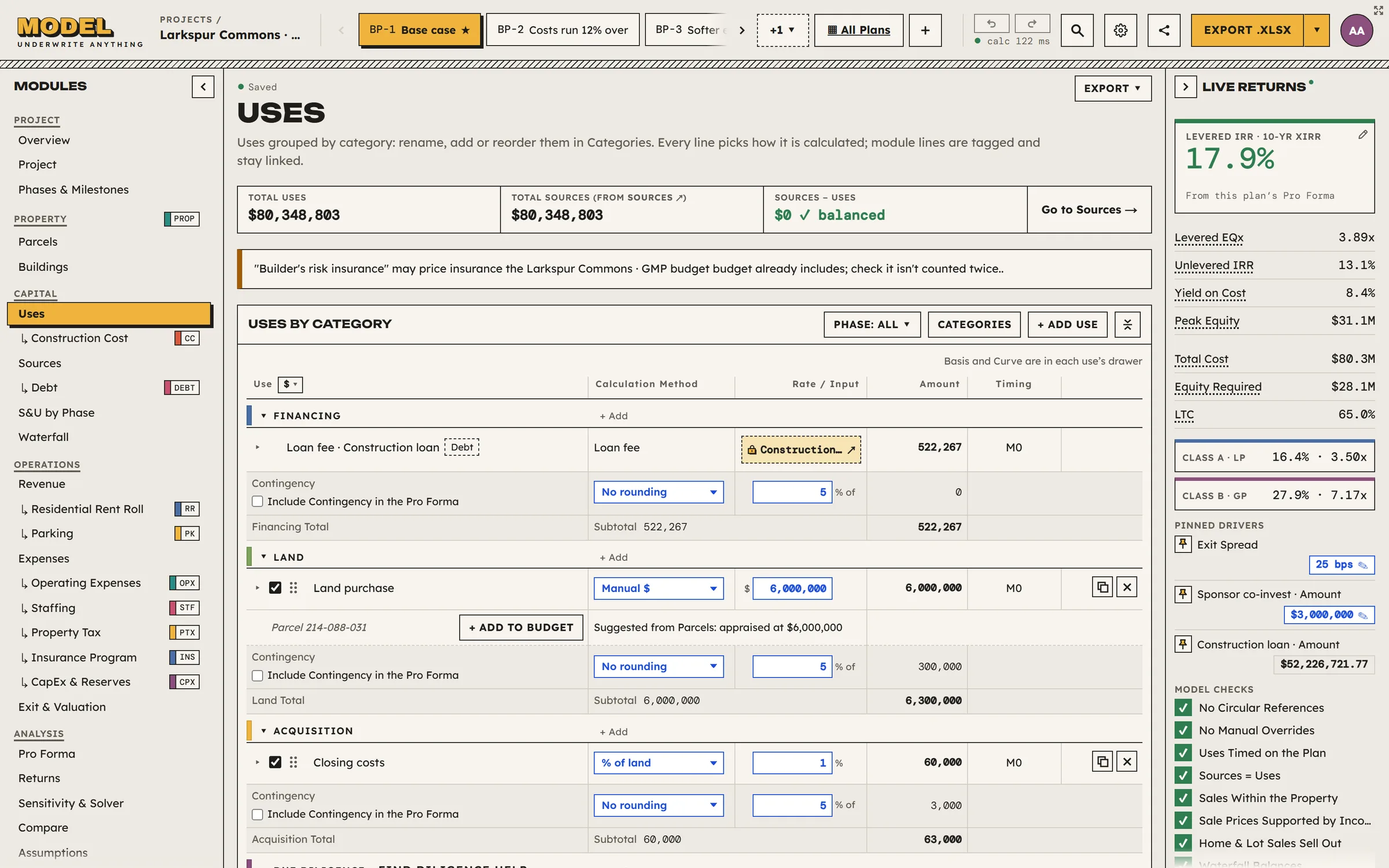
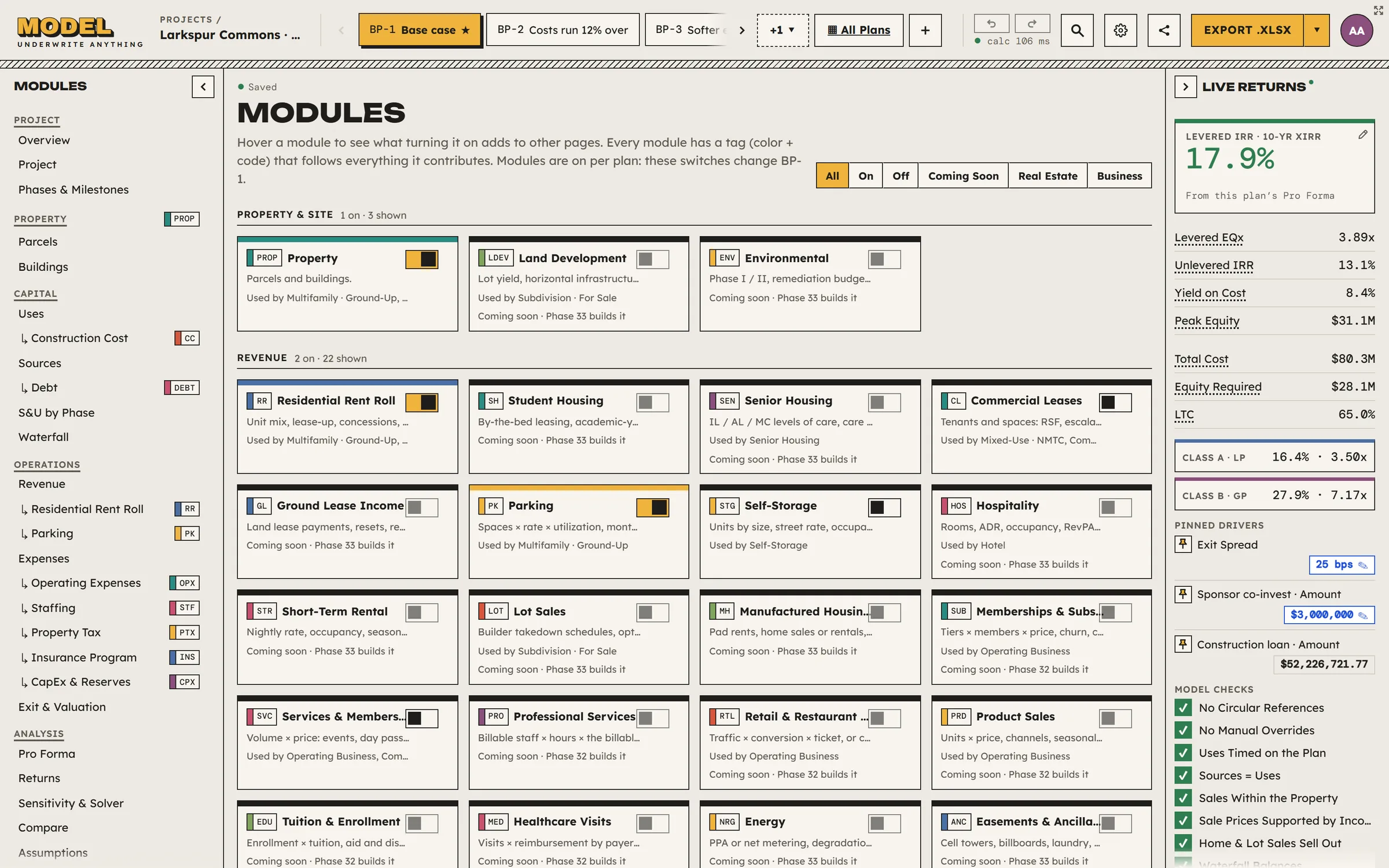
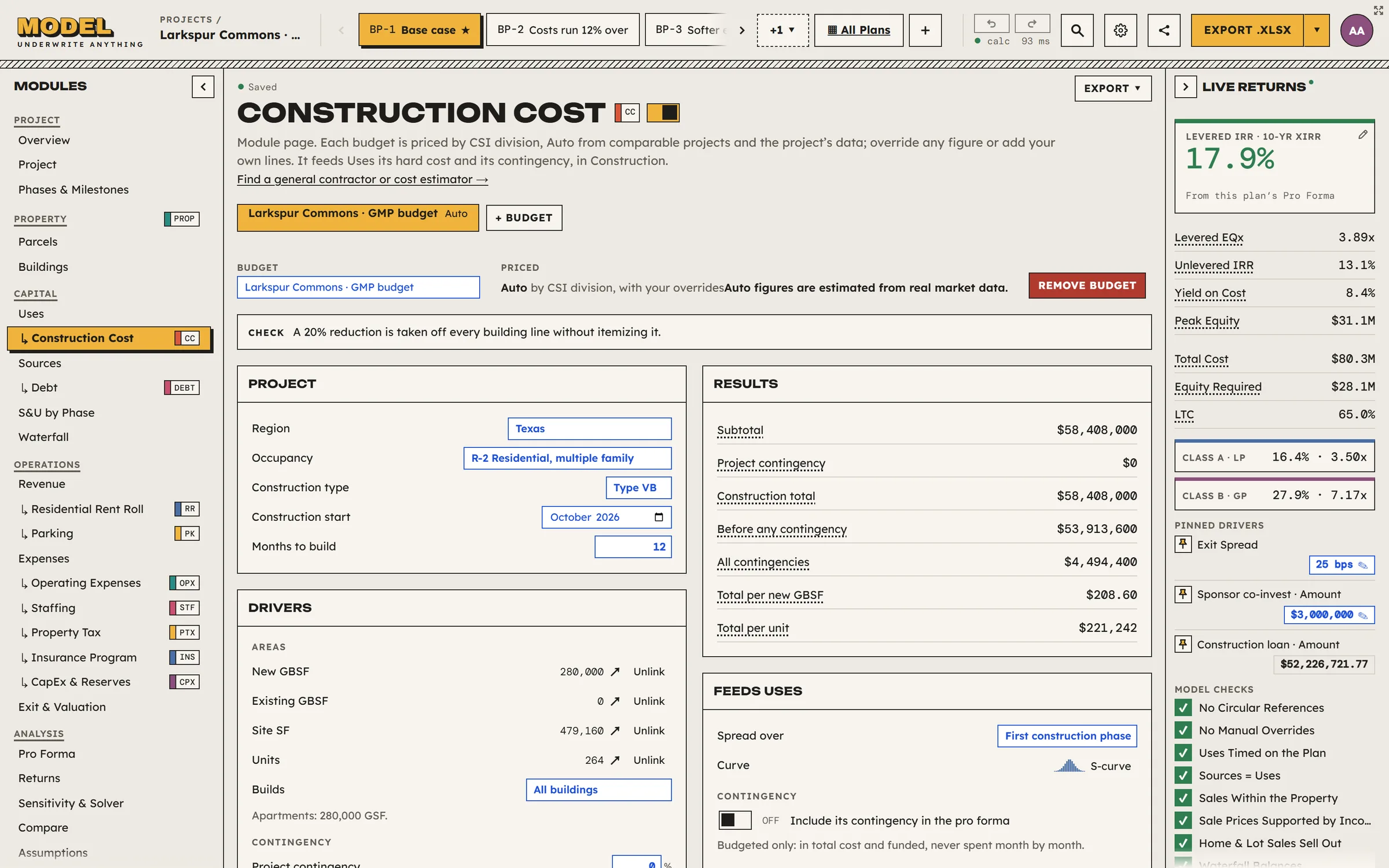
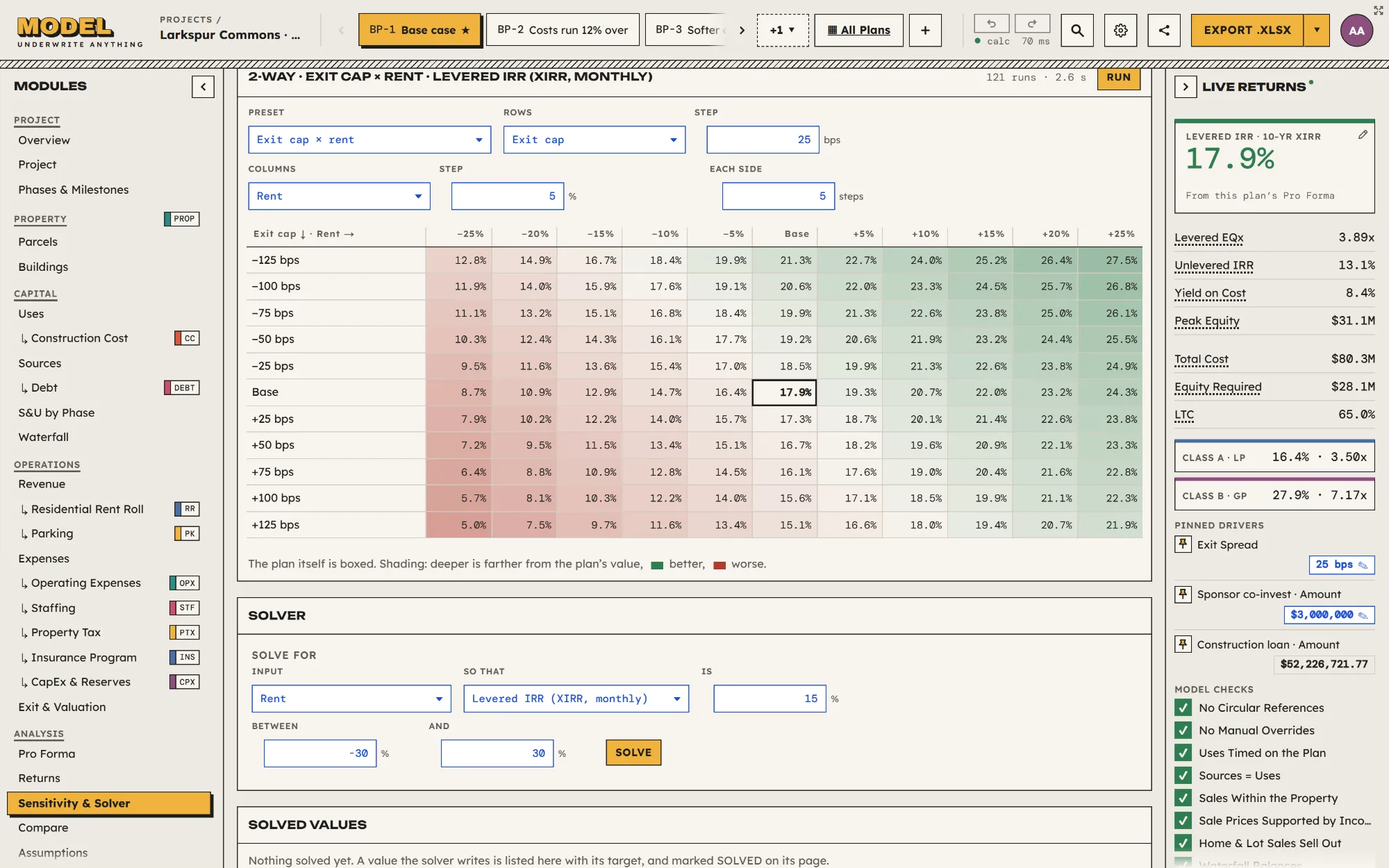
Underwrite real estate projects. Connect costs, funding, income, timing, and returns in one flexible workspace.
Combine modules for property, revenue, construction, financing, and operations. Add the detail your project needs within one connected model.
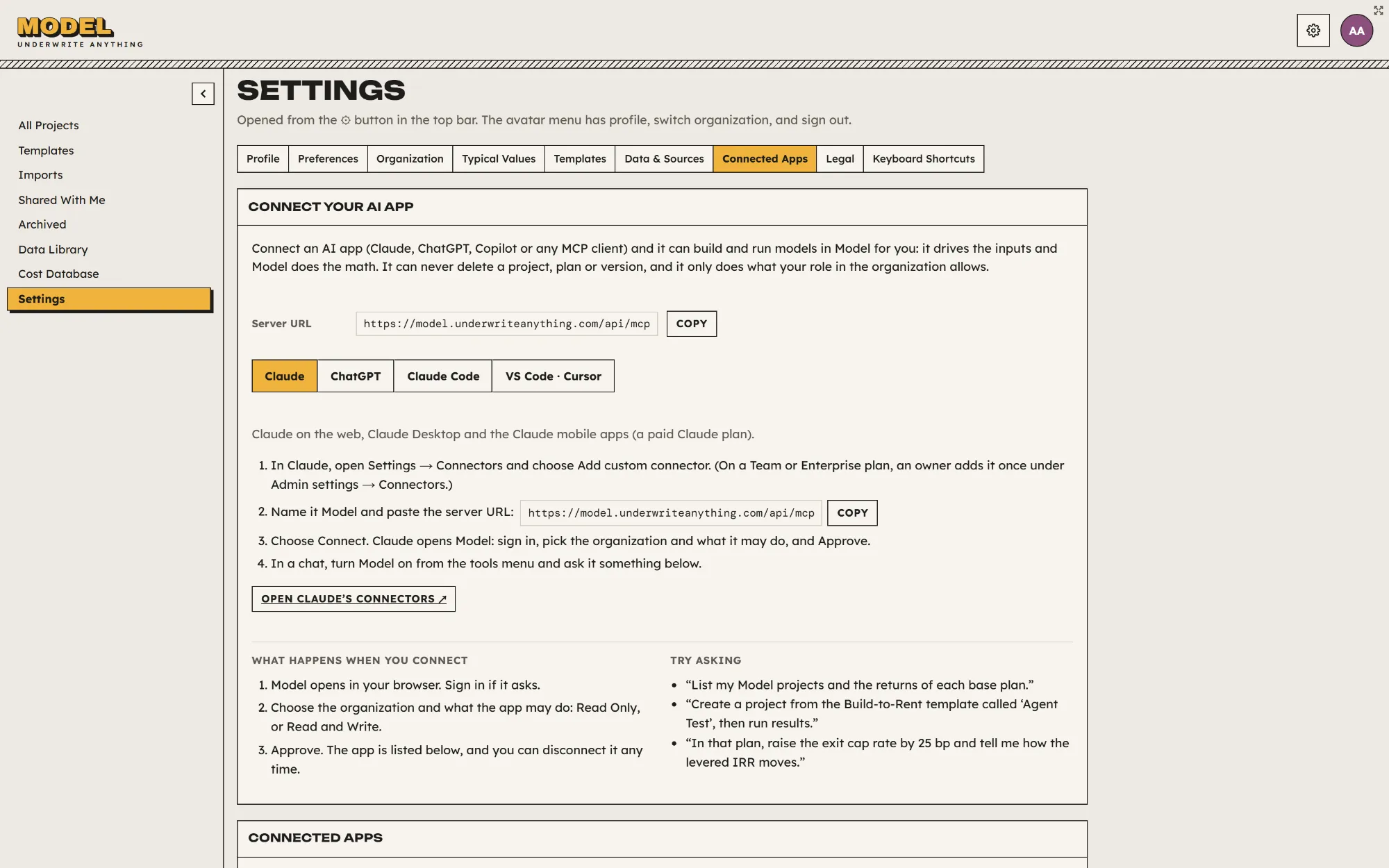
Connect your AI through Model’s MCP server to create projects, update inputs, and compare scenarios. Model’s engine performs the math; AI does not rewrite its equations.
Model estimates construction costs from region, timing, type, area, and your inputs, using a cost model informed by real data.
Ask the what-if questions. Use one-way and two-way sensitivity tables and a tornado chart to see which inputs matter, then let the solver tweak an input to reach a return target or fix a problem in your deal.
Already have a pro forma in Excel? Connect your AI app to Model, give it the workbook, and it builds the project for you.
The video has no sound. Connect Claude, ChatGPT or another AI app to Model’s MCP server. Give it your workbook and ask it to build the project in Model and find a way to increase profit by 10%. It enters the numbers through Model’s tools and Model does the math. It runs a sensitivity and the solver, which finds that raising rent 2.01% takes profit from $13,565,066 to $14,921,573. Every input it set is marked, so you can check it or undo it.
The file goes to your AI and never to Model. Model sees only the inputs your AI sets. Available on Business and up.
See how it worksKeep the assumptions, calculations, and results connected while you work.
Scroll to explore
Live Returns shows the effect of your changes as you work, so you can adjust inputs and watch the results update in one place.
Replace a calculated result with your own value or supported equation, and restore Model’s method whenever you need it.
Anchor dates to phases, milestones, or events such as stabilization, so dependent timing follows the project when anything moves.
Review alternative business plans or versions of one plan with assumptions and results side by side. Set your own targets for IRR, equity multiple, cash flow, DSCR, and other return measures.
Build the equity classes and distribution tiers your structure needs. Set preferred returns, hurdles, catch-ups, and residual splits, then review the cash flow and returns allocated to each class.
Find a value, understand a change, and keep the workspace comfortable for the way you work.
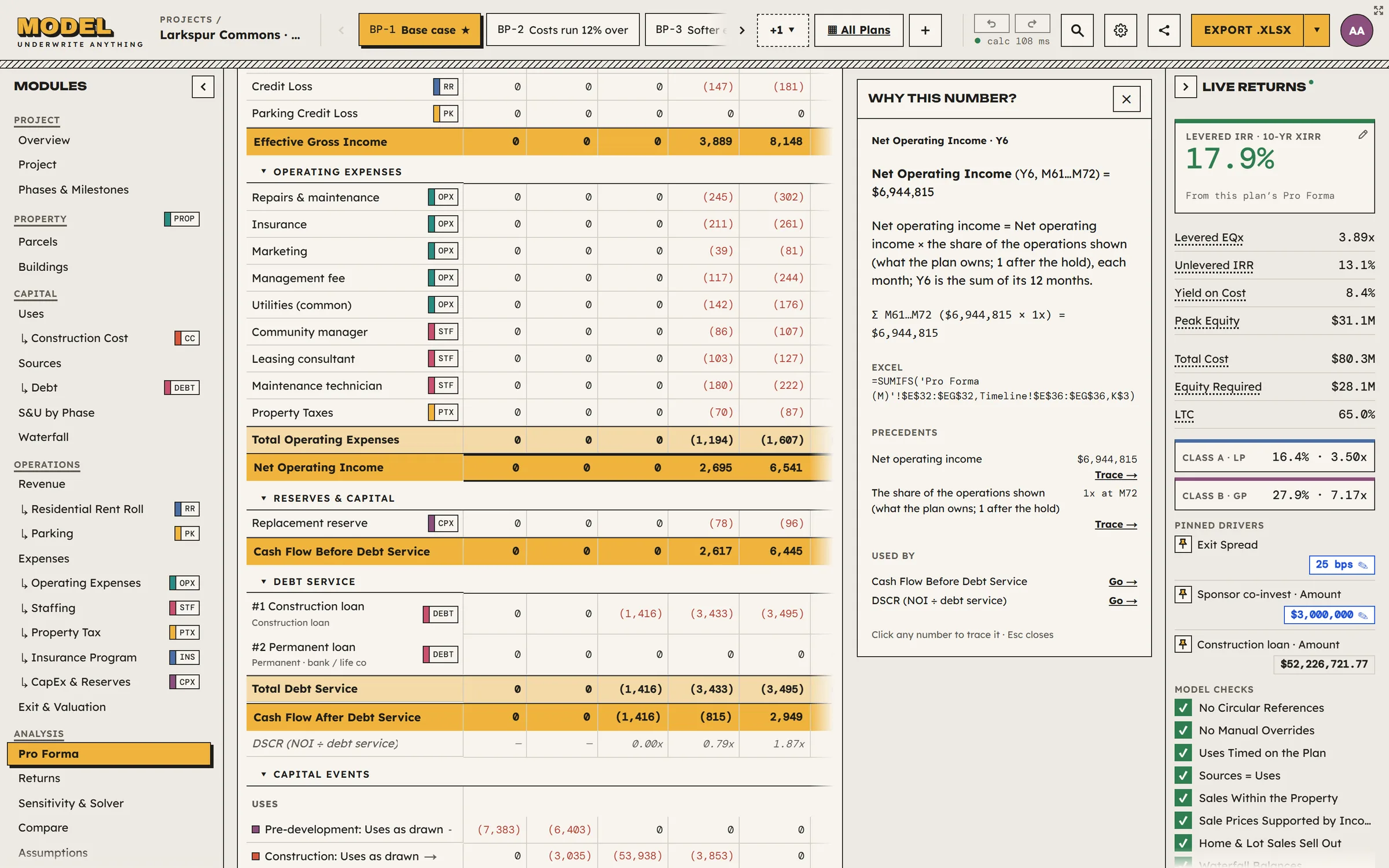
Read financial definitions beside the work. Inspect calculations and review alerts that identify changed values and issues that need attention.
Explore explanations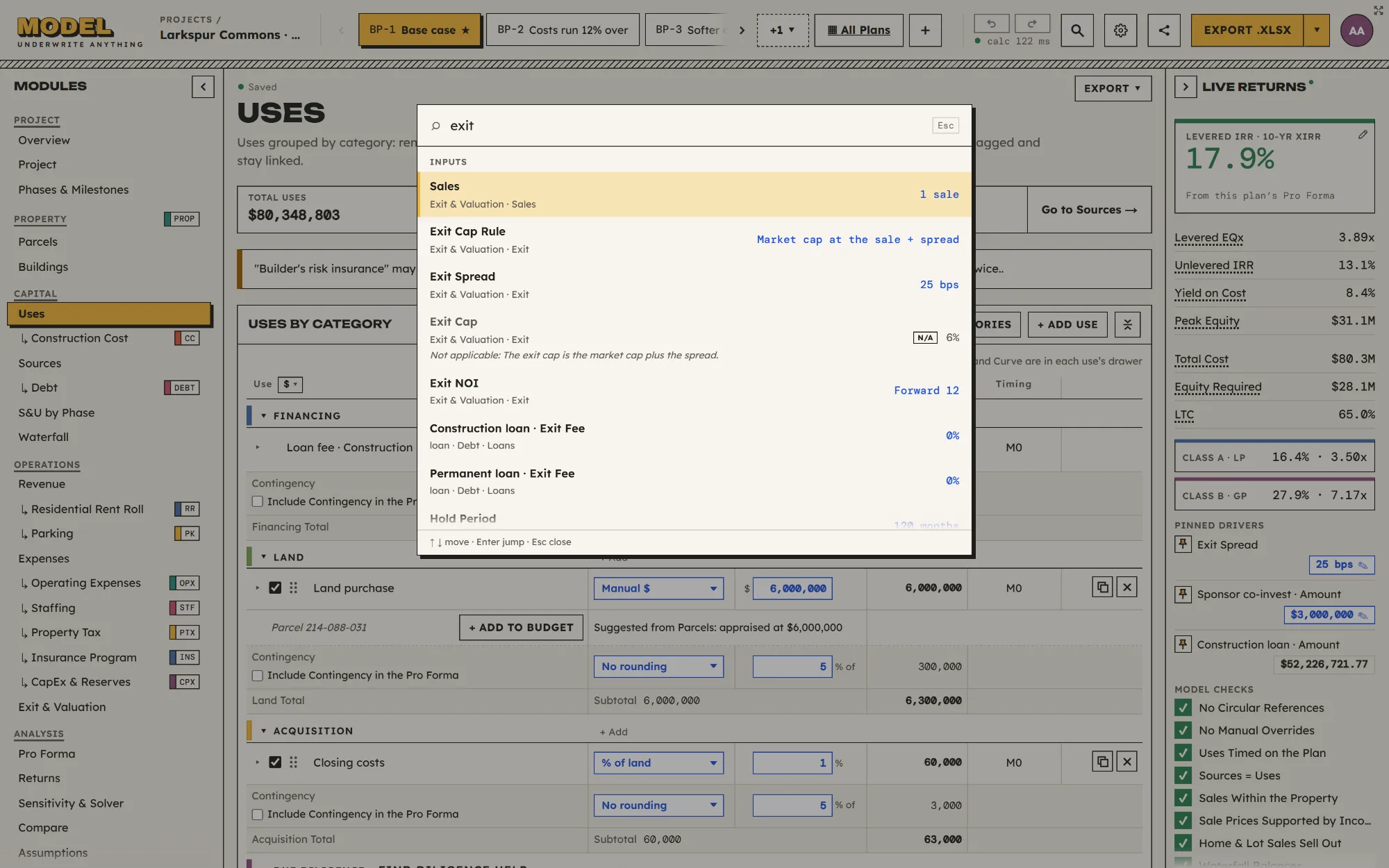
Search inputs, calculated figures, and workspace pages by name, keyword, or current value. Jump directly to the matching field and its context.
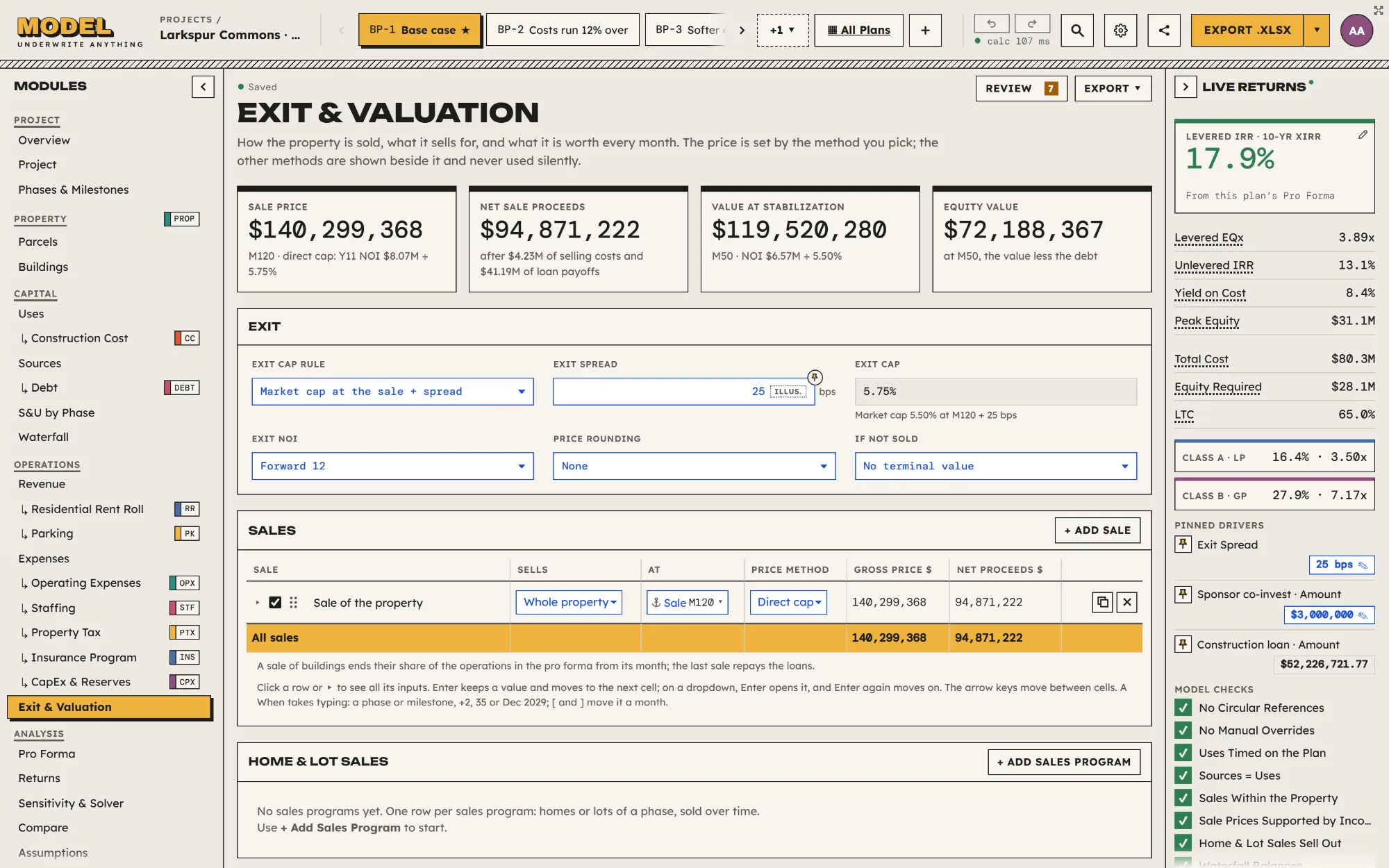
Pin frequently used inputs beside Live Returns and adjust the same underlying fields without leaving the page.
Explore pinned inputsExplore the assumptions, tools, and results for a project type.
Start with one deal. Add depth and capacity as your work grows.
Additional modelers: 5% off the second, 10% off the third, 15% off the fourth, and 20% off each from the fifth onward. Read-only guests do not add paid seats.
Work through your first deal.
No subscription fee · one modeler
Explore FreeFor the work you do often.
First modeler · Billed monthly
Explore ProFor the more involved deal.
First modeler · Billed monthly
Explore BusinessMore processing. More guided support.
First modeler · Billed monthly
Explore Business PlusTrial includes Business features; live-formula Excel export requires a paid subscription. At expiry, return to Free; work above Free capacity is retained read-only. *Unlimited capacity is subject to fair use.
Checked = included in the plan. Dash = not included.
| Feature or module | Free | Pro | Business | Business Plus |
|---|---|---|---|---|
| Plan and Capacity | ||||
| Base Price for First Modeler Seat | $0 | $49 per month or $490 per year | $119 per month or $1,190 per year | $249 per month or $2,490 per year |
| Active Projects | 1 | 5 | Unlimited* | Unlimited* |
| Saved Plans per Project | 2 | 5 | Unlimited* | Unlimited* |
| Organization Workspace and Modeler Seats | 1 modeler only | Up to 3 modelers · progressive seat discounts | Up to 10 modelers · progressive seat discounts | Unlimited modelers · progressive seat discounts |
| Core Underwriting and Controls | ||||
| Monthly Calculations and Returns | Included | Included | Included | Included |
| Project Templates | Included | Included | Included | Included |
| Loan Terms and Debt Service | Included | Included | Included | Included |
| Refinancing | Included | Included | Included | Included |
| Explanations Beside the Numbers | Included | Included | Included | Included |
| Pin Frequently Used Inputs | Included | Included | Included | Included |
| Manual Value Overrides | Included | Included | Included | Included |
| Data, Benchmarks, and AI Integrations | ||||
| Entered Rates and Forward Paths | Included | Included | Included | Included |
| Connect Your AI to Model | —Not included | —Not included | Launch Feature | Launch Feature |
| Plans, Sensitivity, and Versions | ||||
| Named Versions and Restore | Included | Included | Included | Included |
| Compare Plans and Versions | Included | Included | Included | Included |
| Multiple-Plan Comparison | —Not included | Included | Included | Included |
| Version Comparison | —Not included | Included | Included | Included |
| Sharing and Exports | ||||
| Read-Only Model Links | Included | Included | Included | Included |
| Calculation Context and Integrity Stamp | Included | Included | Included | Included |
| Excel, PDF, and PNG Exports | Summary PDF + charts | Full component PDFs + packs | Full packs + custom branding | Full packs + custom branding |
| Export Branding | Small Made with Model footer | Small Made with Model footer | Custom logo in footer or no promotional watermark | Custom logo in footer or no promotional watermark |
| Named Read-Only Guests | —Not included | No modeler-seat charge | No modeler-seat charge | No modeler-seat charge |
| Workspace modeler roles and organization settings | —Not included | Included | Included | Included |
| Custom and Organization Templates | —Not included | Included | Included | Included |
| Live-Formula Excel Export | —Not included | From month two of paid subscription | From day one of paid subscription | From day one of paid subscription |
| Pros Directory | ||||
| Find Professionals for the Work | Included | Included | Included | Included |
| Investor Distributions | ||||
| Flexible Equity Waterfalls | Basic pro-rata | + preferred return, capital return and residual split | + hurdles, catch-up, investor classes and NAV | + hurdles, catch-up, investor classes and NAV |
| Property and Revenue Modules | ||||
| PROPProperty · parcels, buildings, land residual, and maximum allowable offer | Included | Included | Included | Included |
| ACQReal Estate Acquisition · multi-parcel/building purchase inputs | Included | Included | Included | Included |
| RRResidential Rent Roll · unit mix, lease-up, concessions and rent/recovery assumptions | Included | Included | Included | Included |
| CLCommercial Leases · full supported lease economics, including TI/LC and recoveries | Included | Included | Included | Included |
| PKParking | Included | Included | Included | Included |
| SVCServices / Volume × Price · simple property/community-facility services | Included | Included | Included | Included |
| CUSCustom Schedule · typed/pasted revenue series | Included | Included | Included | Included |
| STGSelf-Storage | —Not included | Included | Included | Included |
| Operating and Business Modules | ||||
| OPXOperating Expenses · ordinary insurance/utility/management inputs included | Included | Included | Included | Included |
| STFStaffing · property operations | Included | Included | Included | Included |
| PTXProperty Tax · reassessment and ordinary abatement/PILOT schedules · financing an incentive program through TIF is separate | Included | Included | Included | Included |
| UTLUtilities calculator · engineering-based estimates | Included | Included | Included | Included |
| CPXCapEx & Reserves · basic schedule | Included | Included | Included | Included |
| Construction Cost Modules | ||||
| CCConstruction Cost · manual budget entry with basic CSI trade detail | Included | Included | Included | Included |
| CCConstruction Cost · custom line items, manual takeoffs, multiple budgets and renovation planning | —Not included | Included | Included | Included |
| CCConstruction Cost · Auto estimate by CSI division from real market data, region, timing, construction type, and use | —Not included | —Not included | Included | Included |
| Tax and Capital Programs | ||||
| Property-Tax Assumptions and Pre-Tax Returns | Included | Included | Included | Included |
| NMTCNew Markets Tax Credit · specialist financing, fees, compliance and unwind | —Not included | —Not included | Included | Included |
| Analysis and Portfolio Modules | ||||
| SENOne-Way Sensitivity | Included | Included | Included | Included |
| SENTornado Analysis | —Not included | Included | Included | Included |
| CMPComps · rent, sale, land, and density · manual ordinary assumptions remain Free | —Not included | Included | Included | Included |
| SENTwo-Way Sensitivity and Target Solver | —Not included | —Not included | Included | Included |
| ECOEconomic Impact · sourced GDP/jobs/FTE-year analysis for funder submissions | —Not included | —Not included | Included | Included |
| Support and Processing Capacity | ||||
| Standard Help and Support | Help Center and email | Help Center and email | Help Center and email | Help Center and email |
| Priority Business-Hours Support | —Not included | —Not included | —Not included | Priority queue in business hours |
| Guided Workspace Setup | —Not included | —Not included | —Not included | One 30-minute session |
| Periodic Workflow Review | —Not included | —Not included | —Not included | One 30-minute session a quarter |
Search the local Pros directory by service and location. Find architects, engineers, contractors, lenders, and other specialists, then choose which model pages to share and confirm the recipient.
Open a sample project and make it yours: every page and every feature, no account.
Shorter scene tour, gradual ink reveal, and spring-settled hatching. Color Segments is the selected rail.
Local concept. Pricing follows the current proposal. Base44 unchanged.
“Most popular” is proposed design positioning, not measured adoption. Signup and trials are local previews.